Skate School
LightLearn and mess around in the school park.
maps/SkateSchool.skate
Menu
Learn and mess around in the school park.
maps/SkateSchool.skate
The contest course.
maps/MaloofMoneyCup.skate
An indoor warehouse park.
maps/BlackBoxPark.skate
A park in the middle of the city.
maps/DownTownSkatePark.skate
A park on the industrial side of town.
maps/IndustrialSkatePark.skate
A small park to warm up in.
maps/StartPark.skate
Port Carverton University: campus plazas, the Observatory dam and the Super-Ultra Mega-Park.
maps/University.skate
The city centre: ledges, stairs, rails and traffic.
maps/DownTown.skate
Docks, warehouses, gaps and the old plant.
maps/Industrial.skate
Cut out on its own and hidden. It spawns outside its geometry. The full park is inside University.
maps/MegaPark.skate
No world matches that filter.
The CrossBar is the pause menu: Start, which is Esc on a keyboard, opens it. Four categories hold fourteen rows. FREESKATE drops you in, ONLINE finds people, LEARN shows the stick map and the fan-game notice, and OPTIONS stores difficulty, fullscreen, Lite Mode, and the local cleanup rows.
Choose World is a list of ten files, not four postcard cities. Six are light parks, three are heavy cities, and MegaPark is hidden. The menu has no per-world screenshot, so the file name and the heavy mark are how you tell them apart.
Unfiltered, the client puts Skate School first, then the other light parks, then University, Downtown, and Industrial, and MegaPark last. Parks means heavy is false and the row is not hidden. Heavy cities are the three with traffic, campus, or the plant. Hidden is only MegaPark.
A session does not translate your world into your friend’s world. If the host is in University, Join with a Code still needs University on your side. The file names are the stems the client uses, including the capital T in DownTown.
Start here when you want a light file. Quarters and rails sit close together, so a basic ollie is enough to feel the board. It stays with the light parks. The three cities do not.
The course is a light park, not a city. Treat it as a lap with a start and a finish rather than a place to wander. It loads with the other parks, ahead of University.
The warehouse is a light indoor park. The name points at the studio that made the original game, and it is still just a map file in this client. It is not an endorsement line.
This is the park, not the Downtown city. The city file is heavier and sits later in the list. Use the park when you want ledges without the traffic mesh.
Same split as Downtown: the park file is light, and the Industrial city is a separate heavy map. Do not join a friend who loaded the city while you loaded the park.
The smallest warm-up file. Push with A or Space, flick once, and leave before you host. A session still has to share one world, so agree the file before anyone clicks Host.
University is a heavy city. The Super-Ultra Mega-Park geometry lives inside this file. The separate MegaPark row is hidden because that spawn sits outside its own geometry.
Downtown is a heavy city, with traffic as well as ledges. Expect a longer download from your copy than any park. The stem in the file name is DownTown, with that capital T.
Industrial is the third heavy city: docks, the plant, and longer gaps. Push harder if you want more speed, and expect Hardcore to throw you off the landing.
MegaPark stays hidden so it is not mistaken for a playable park. The rideable Super-Ultra Mega-Park is the one inside University. Counting this file keeps the set at ten.
Spot Battle is not one of the fourteen rows. Game Server can show a file count and a size at the data origin, or the zip address. That count is a different thing from the copy you already converted.
Difficulty appears twice, under FREESKATE and under OPTIONS, and both open the same three board settings. Reset First-Run Setup asks for world and difficulty again next launch. Saved Downloads deletes maps this browser kept. Delete Local Settings forgets every saved option, including Lite Mode.
Drop in at the chosen world.
Pick another part of Port Carverton.
How forgiving the board is.
Host, browse, or join with a code. Same world.
Shows file count and megabytes at the data origin, or a zip address.
Opens the project Discord.
Controller and keyboard layout.
Returns to the fan-game notice.
Same three settings as Freeskate.
Enter fullscreen when you drop in. Hold Esc to leave.
Lowest textures, no shadows, lighter image.
Ask for difficulty and world again next time.
Delete maps kept in this browser.
Forget every option this browser saved.
No menu row matches that search.
Easy, Normal, and Hardcore change the board. Lite Mode and Full Quality change the picture, and both leave anti-aliasing at 0. University, Downtown, and Industrial are hundreds of megabytes each, and Lite Mode still warns that a heavy city may be too much for a phone.
Full Quality uses shadows 2 and scale 100. Texture quality is 2 when the device is small and 0 otherwise. Lite is the row offered to phones first, with texture quality 3, shadows 0, and scale 75. The pause menu also has Motorized and Custom. The front end does not give numbers for those two.
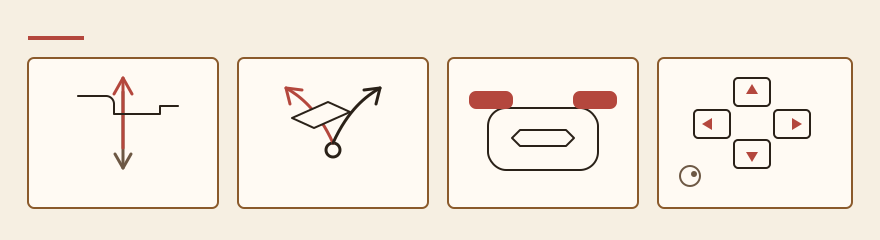
LEARN then Controls opens the layout: left stick on W A S D, right stick on the arrows, bumpers on Z and X, grabs on Shift and C. Trackpad Mode is a PLAYER option, not its own CrossBar row.