Left stick
WASD
Steer, push off, and crouch.
Hands
WASD
Steer, push off, and crouch.
←↑↓→Arrow keys
Flick It tricks, or Trackpad Mode when that option is on.
Space
Push.
E
Face button B.
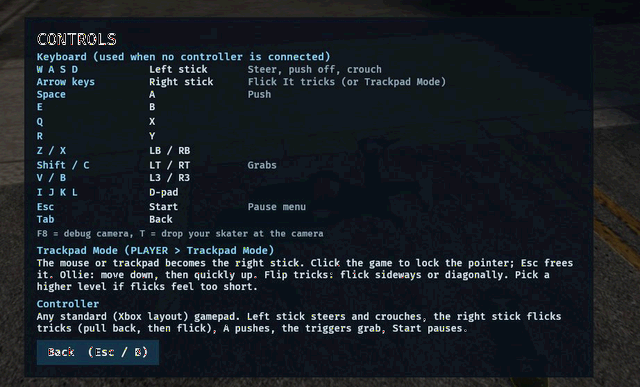
Flick It is the right stick. Pull it back, then forward, and the board leaves the ground. That is an ollie. The other way is a nollie. Arrow keys stand in for the stick when you have no pad. Z and X are the bumpers. Shift and C grab.
On a phone the on-screen sticks are drawn first: left for steer and crouch, right for the flick. The right touch stick springs back when you lift, so a slow drag does not hold a pretend input. These eighteen rows are the whole map in the current client, including F8 and T, which are debug tools rather than tricks.
Face buttons stay in Xbox order: A push, then B, X, and Y on E, Q, and R. On a phone the client draws two sticks plus A, B, X, Y, the bumpers, the triggers, Start, and Back. Those on-screen buttons feed the same pad as the keyboard.
X is both a face button and the right bumper, depending on the row. The face button X is the Q key. The bumper labeled X is the X key, paired with Z. Read the action column before you rebind from memory.
Q
Face button X.
R
Face button Y.
Z / X
Left and right bumpers.
Shift / C
Grabs. The left bumper is the left hand and the right bumper is the right hand.
V / B
Stick clicks.
I J K L
I up, K down, J left, L right.
Esc
Pause menu. Hold Esc to leave fullscreen.
Tab
Back.
F8
Debug camera.
T
Drop your skater at the debug camera.
Left on-screen stick
Steer and crouch on a touch screen.
Right on-screen stick
Flick It. Drag down, then up, to ollie. The stick springs back when you lift.
Mouse or trackpad
PLAYER then Trackpad Mode. Click to lock the pointer. Move down, then quickly up, to ollie.
Xbox-layout pad
Right stick flicks, A pushes, triggers grab, and Start pauses.
No control row matches that search.
Back then forward ollies. A flick off to the side on the way up kickflips or heelflips. Hold a bumper in the air to grab, left hand on the left bumper and right hand on the right. Ollie into a rail or ledge and hold the stick to keep the grind.
Push lives on A, or Space. Harder pushes make more speed, and more speed makes bigger gaps. Land with the board level. That landing is on your bolts. Hardcore does not add a new button. It only makes the same landing less forgiving.
Trackpad Mode is under PLAYER, not under a CrossBar category. Click to lock the pointer, move down, then move up quickly. If the pointer never locks, the flick will not read, and you will push around on the left stick wondering why the board stays down.
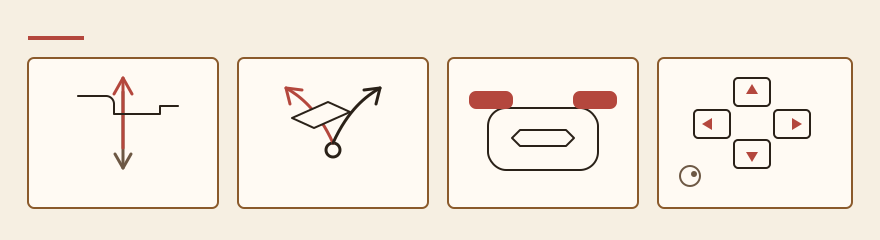
Esc opens the CrossBar. Holding Esc leaves fullscreen. Tab is Back. The D-pad is I J K L, which matters in the menu more than on a line. F8 is the debug camera and T drops the skater at that camera. Leave those two alone unless you are already stuck in geometry.
A gamepad in Xbox layout uses the same ideas: right stick flicks, A pushes, triggers grab, Start pauses. The keyboard rows are the fallback when you have no pad, not a second moveset.
Use the light school park when you want the stick without a city load. Hold Space and roll a flat. Press the down arrow, then the up arrow. That shape is the ollie. Do it again and shove the up arrow off to one side while the board is still rising. Left is one flip, right is the other, and there is still no separate flip key.
In the air, hold Z for the left hand or the X key for the right hand, then let go before the wheels touch. A grab you keep holding will tilt the landing. For a grind, pop at a ledge and keep the arrow held along the edge until you want the truck to drop. Releasing the arrow is what ends the grind.
On a phone the left on-screen stick rolls and crouches, and the right on-screen stick is the flick. The right stick recenters the instant the finger lifts, so a grind needs that finger down for the whole rail. At a desk, PLAYER then Trackpad Mode is the same right stick: click to lock the pointer, sweep down, then sweep up.
The letter X on the keyboard is the right bumper. The face button named X is Q, with E for B and R for Y. A tap of Esc opens pause. A hold of Esc leaves fullscreen. F8 moves a debug camera and T plants the skater at that camera. Those two are rescue tools, and dropping with T beside a gap can plant you outside the park.
Esc opens the CrossBar. The download card repeats the ollie while the file comes in. Friends are a separate path under ONLINE.